05 · Electron GUI
The desktop shell for Swing-Analysis (AceCrush brand). The renderer never talks to MediaPipe, OpenCV, or any CV / ML model — it only talks to 127.0.0.1:8321 over HTTP + WS, mediated by the Electron main process (src/main/). Brand split: install / about / docs are AceCrush Swing-Analysis; the macOS top-bar app-menu slot is AceCrush alone; window titles, app header, and i18n strings are Swing-Analysis.
Project layout
src/
├── main/
│   ├── index.ts             ← window creation + PythonSidecar lifecycle
│   │                          + ipc handlers + menu + brand split
│   ├── busy.ts              ← (plan 005) callId-cancel registry (AbortController map)
│   ├── panels.ts            ← F12-style detachable Clips / Log windows
│   └── settings.ts          ← userData, output_dir persistence
├── preload/
│   └── index.ts             ← contextBridge.window.api (typed surface)
└── renderer/
    ├── index.html            ← main window entry
    ├── clips.html            ← detachable clips-panel entry
    ├── log.html              ← detachable event-log entry
    └── src/
        ├── main.tsx            ← App root
        ├── clips-window.tsx    ← panel-window mount
        ├── log-window.tsx
        ├── App.tsx             ← 2-column layout, state machine, WS wiring
        ├── i18n.ts             ← en/zh dictionary + locale hook
        ├── api/
        │   ├── client.ts       ← typed fetch + WS + auto-reconnect
        │   ├── types.ts        ← wire types (mirror schemas.py)
        │   └── panels.ts       ← panel state/action payload shapes
        ├── hooks/
        │   └── theme.tsx       ← dark/light theme provider
        └── components/
            ├── VideoPicker.tsx        ← drag-drop + file dialog
            ├── ParamsForm.tsx         ← right-side parameter grid
            ├── ProgressPanel.tsx      ← Start/Cancel + dual progress bars
            ├── ResultsPanel.tsx       ← live segments list + viz.mp4 frame
            ├── ResultsActionsBar.tsx ← ⬇ segments.json / ⬇ viz.mp4 / open-dir / export / delete
            ├── ClipsBar.tsx           ← bottom thumbnail strip + ↗ detach
            ├── EventLogList.tsx       ← center event log + ↗ detach
            ├── ClipPlayer.tsx         ← inline clip player + watermark
            ├── ClipGrid.tsx           ← clip card rendering + tooltip
            ├── HelpPanel.tsx          ← overlay: usage / params / menu / tips
            ├── SettingsPanel.tsx      ← overlay: annotation colors + output_dir
            ├── Toast.tsx              ← transient status toasts
            ├── BusyModal.tsx          ← (plan 005) centred logo+spinner+取消 modal for long ops
            ├── Tooltip.tsx            ← uniform icon-only tooltip system
            ├── ErrorBoundary.tsx
            └── panels/
                ├── ClipsPanelApp.tsx  ← panel-window content (clips)
                └── LogPanelApp.tsx    ← panel-window content (event log)
Brand conventions
| Surface | String | Why |
|---|---|---|
| macOS top-bar app-menu slot | AceCrush | parent brand (driven by app.setName in src/main/index.ts when running on darwin) |
| macOS Dock icon | tennis-ball logo | parent brand (set via `app.dock.setIcon(build/icon.png |
BrowserWindow title / HTML <title> | Swing-Analysis | this app (no brand) |
| Help → About menu item | 关于 AceCrush Swing-Analysis | brand + app |
About dialog message | AceCrush Swing-Analysis | big-title slot |
package.json productName | AceCrush Swing-Analysis | installer / dmg / NSIS label; Windows shortcut name; userData folder name |
package.json appId | com.leochan007.acecrush.swinganalysis | reverse-DNS, brand segment first |
package.json appImage.executableName | swing-analysis | Linux ELF binary name (Linux convention = lowercase) |
app.settings/i18n app.title | 🎾 Swing-Analysis | app header |
URLs (acecrush-dev.github.io/swing-analysis-app/, github.com/acecrush-dev/swing-analysis-app) and the npm-package name (swing-analysis-gui) stay lowercase because they are stable identifiers — changing them would break external links and npm installations.
Sidecar lifecycle
src/main/index.ts defines class PythonSidecar. Two startup modes chosen via app.isPackaged:
dev (!app.isPackaged)
backend/.venv/bin/python3 -m backend.service --port 0 \
    --data-dir <repo>/backend/data \
    --models-dir <repo>/backend/models
--port 0 lets uvicorn pick a free port; the line SWING_SERVICE_URL=http://127.0.0.1:<port> in stdout reveals it. The main process captures this, parses the URL, and resolves the WebSocket endpoint at ${url}/api/jobs/<id>/events. On crash (process exits without ever printing the marker line within 15 s), a dialog opens and the app quits.
packaged (app.isPackaged)
<resourcesPath>/backend/swing-backend(.exe) --port 0 \
    --data-dir <userData>/backend-data \
    --models-dir <resourcesPath>/models
The swing-backend(.exe) binary is what PyInstaller (scripts/build-python-bundle.js) emits into backend/dist/; electron-builder's extraResources rules copy it (along with backend/models/) into resources/ of the packaged app. process.resourcesPath resolves to <app>/Contents/Resources on mac, <app>/resources/ on win/linux. defaultDataDir() in src/main/settings.ts pivots based on app.isPackaged so the spawned sidecar writes to a per-user, per-OS writable directory (userData).
The legacy process.env.SWING_SERVICE_URL override is still honoured in both modes — useful when you launch the service manually from a terminal during debugging.
Process tree kill
On app.before-quit, the sidecar sends SIGTERM to the process group (process.kill(-pid)) so child Python threads (uvicorn, MediaPipe VIDEO tracker, ONNX runtime worker) shut down cleanly. Followed by proc.kill() as a safety net.
IPC handlers
src/main/index.ts registers all of these; the renderer reaches them through window.api.* (preload). The full surface:
| IPC channel | Preload method | Returns |
|---|---|---|
pick-video | pickVideo() | string | null (absolute path, or null on cancel) |
get-service-info | getServiceInfo() | sidecar SWING_SERVICE_URL or null |
get-dropped-file-path (preload-only helper, not IPC) | getDroppedFilePath(file) | absolute path (uses webUtils.getPathForFile — Electron 32 removed File.path) |
export-package | exportPackage(jobId, callId) | { ok, path } or { ok: false, error } — callId (UUID) lets the renderer cancel mid-zip |
open-external | openExternal(url) | boolean (URL scheme http/https only) |
open-output-dir | openOutputDir(jobId, callId) | { ok, path } or { ok: false, error } — opens DATA_DIR/jobs/<id>/ in OS file manager |
clear-output-dir | clearOutputDir(callId) | { ok, path, deleted_count, cleared_job_ids } |
cleanup-clips | cleanupClips(jobId, callId) | { ok } or { ok: false, error } — main process forwards DELETE /api/jobs/{id} with signal to the sidecar; abort reaches the fetch |
app:get-icon-data-url | getIconDataUrl() | string | null — base64 PNG data URL for the BusyModal logo |
cancel-call (event) | cancelCall(callId) | fire-and-forget — ipcRenderer.send only, no return; the main process aborts the matching AbortController |
show-about | showAbout() | void — modal dialog (brand + app title) |
settings:get | getSettings() | { output_dir, default_output_dir, configured_output_dir } |
settings:set-output-dir | setOutputDir(dir) | { ok, output_dir } or { ok: false, error } — persisted to userData/settings.json |
settings:pick-output-dir | pickOutputDir() | { ok, path } (folder picker) |
panel:open / panel:close / panel:is-open | openPanel(kind) / closePanel(kind) / panelIsOpen() | { ok } |
panel:get-state / panel:push-state | getPanelState() / pushPanelState(snap) | round-trips a frozen snapshot of clips + log between main and panel windows |
panel:action-request | sendPanelAction(action) | clip-select → main window focus + seek |
panel:state (event) | onPanelState(cb) | subscription |
panel:action (event) | onPanelAction(cb) | subscription |
menu:<id> (events) | onMenuEvent(channel, cb) | subscription (open-file, export-package, clear-job, clear-output, about) |
Application menu
Defined in buildMenu() (src/main/index.ts):
- macOS first menu = App menu (
app.nameslot). Carries the standard About / Hide / Services / Quit entries — required because macOS auto-promotes the first menu and would otherwise rename our "System" menu to "AceCrush" and hide it (see the inline comment inbuildMenu()). - System menu (always 2nd on mac): Open File… (
Cmd/Ctrl+O), Export Package… (Cmd/Ctrl+E), separator, Clear Current Job Dir, Clear Output Dir…, separator, Quit. - Help menu: Help Content (opens
https://acecrush-dev.github.io/swing-analysis-app/), separator, About AceCrush Swing-Analysis.
The renderer receives each click as a menu:<id> IPC event and reacts the same way as the in-app button (open file dialog, trigger export, etc.), so the keyboard shortcuts work whether or not a panel window currently has focus.
Long-op busy modal (plan 005)
Four ops get the centred "logo + spinner + 取消" modal: export-package, clear-output-dir, cleanup-clips, open-output-dir. Implementation is in src/main/busy.ts (callId-cancel registry) + src/renderer/src/busy.ts (imperative startBusy() → React setter bridge) + src/renderer/src/components/BusyModal.tsx:
- callId protocol. Every long op handler takes a
callId: stringsecond arg from the renderer (UUID minted viacrypto.randomUUID()with aMath.random()fallback for very old runtimes). It registers anAbortControllerin aMap<callId, AC>and unregisters it infinally. The renderer's 取消 button callswindow.api.cancelCall(callId)which sends a fire-and-forgetcancel-callIPC; the main process aborts the matching controller. - Per-op cancel coverage.
export-package: archiver'sarchive.abort()triggers anerrorevent with message "Archive aborted"; main unlinks the half-zip infinallyso the user doesn't see a corrupted file.clear-output-dir: pre-check the abort flag beforermSync. The syscall itself is uninterruptible mid-flight, so partially-deleted jobs are NOT rolled back (documented limitation).cleanup-clips: the main process forwards the abort signal into the sidecar fetch. If the sidecar doesn't honour the signal, the Python service completes the delete and the closed fetch on the node side is treated as{ok:false, error:'cancelled'}— best-effort.open-output-dir: effectively instant; the cancel button is a no-op in practice (modal closes the momentshell.openPathreturns).
- Panel freeze. The main window includes its
busystate in thePanelStateSnapshotit pushes every 100 ms. DetachedClipsPanelApp/LogPanelAppwatch for a non-nullbusyand render a full-viewport scrim with the localised "busy.frozen" text +pointer-events:auto, forcing the user back to the main window where the modal lives. - No new IPC for the freeze. The existing
panel:push-state/panel:statechannels already carry every snapshot field; addingbusyis just one more key in the payload, no new infrastructure. - ESC handling. The App-level
keydownlistener (capture phase) swallowsEscapewheneverbusyStateis non-null so the user can't accidentally close the modal via the same key that closes Help / Settings panels. The user MUST explicitly click 取消.
Renderer layout
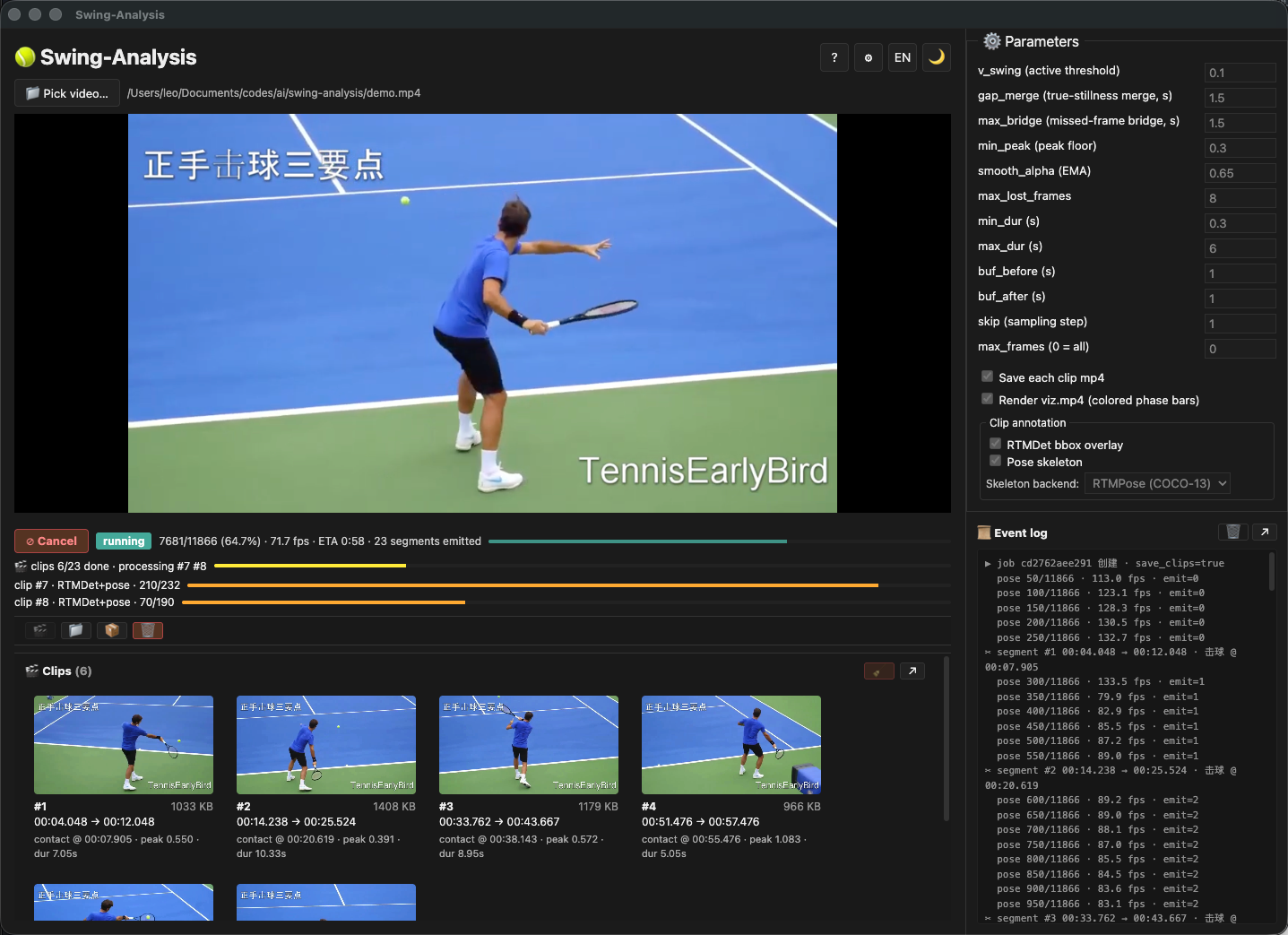
The 2-column main window is built in src/renderer/src/App.tsx. Below is the runtime picture (detached panels collapse back inline when their window is closed):
┌──────────────────────────────────────────────────┬──────────────────┐
│ 📁 [drag-drop zone] Video picker (player)        │ ⚙ Parameters     │
│   ↩ original / ▶ clip / 🎬 viz.mp4               │   grid form      │
│   (with watermark on clip)                       │   + save/viz     │
├──────────────────────────────────────────────────┤   checkboxes     │
│  Progress  ▶ Start  ⊘ Cancel                     │   + clip section │
│  Dual progress bars (queue + per-clip)           │   (RTMDet bbox / │
│                                                  │    pose skeleton │
│  Event log (live WS)                             │    + backend)    │
│                                                  ├──────────────────┤
│                                                  │  Live segments + │
│                                                  │  ResultsActions  │
│                                                  │  (download,      │
│                                                  │   open-dir,      │
│                                                  │   export,delete) │
├──────────────────────────────────────────────────┴──────────────────┤
│ 🎬 ClipsBar  ↗ detach                                             │
│   [thumb][thumb][thumb]…                                           │
└────────────────────────────────────────────────────────────────────┘
State machine in the renderer:
idle  ──[start]──▶  queued  ──[ws.open]──▶  running
                                           │
                                    ┌──────┼──────┐
                                    ▼      ▼      ▼
                                   done  failed  cancelled
SettingsPanel and HelpPanel are overlays (fixed-position modals) keyed off a useState in App.tsx. They cover the entire window without disturbing the underlying layout, Esc-closable, backdrop-click closable.
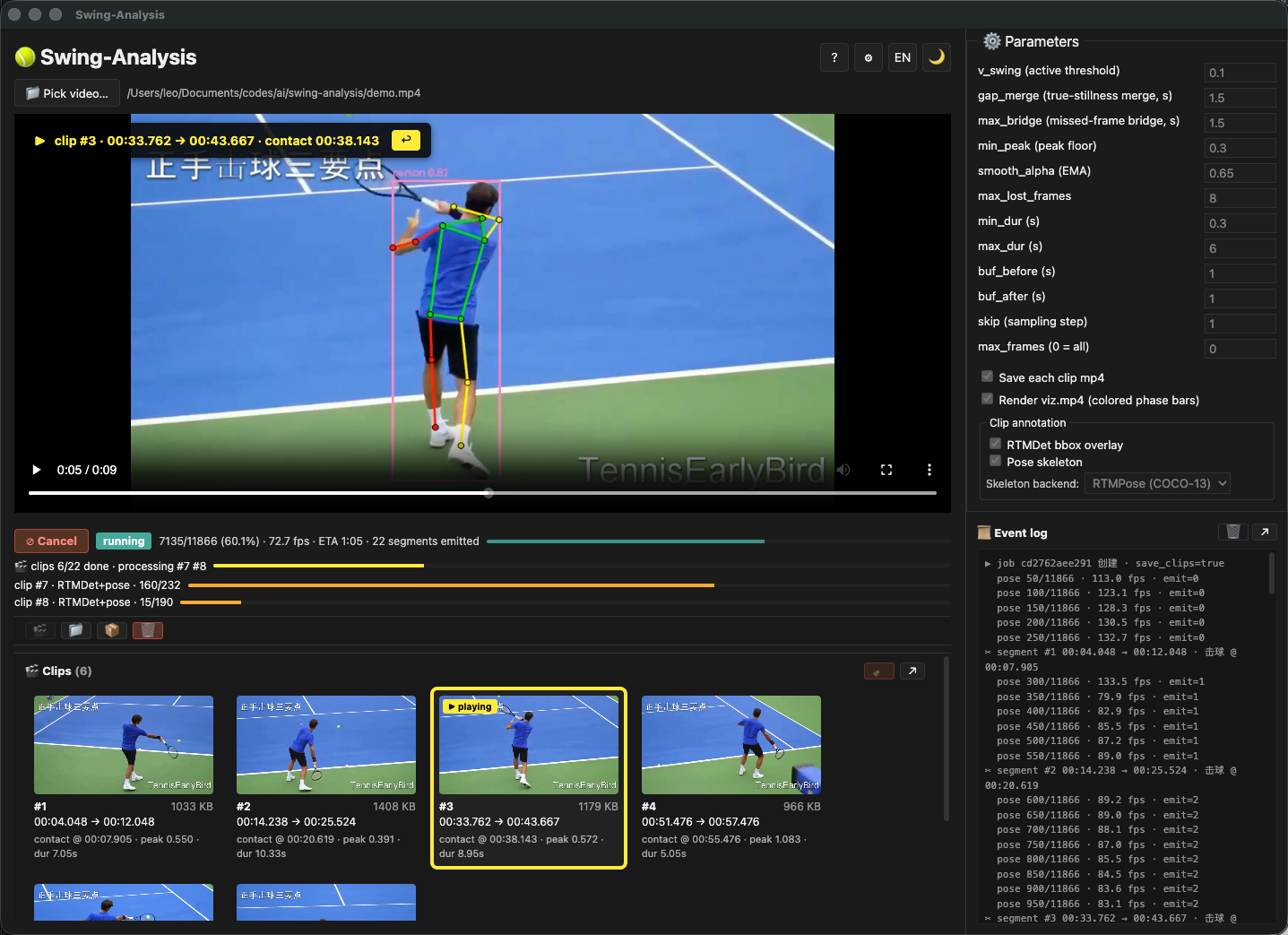
Once clip extraction kicks in, the bottom ClipsBar populates with per-cycle thumbnails; click one to play it inline. With clip_bbox + clip_skel enabled, the player surfaces the annotated overlay (RTMDet box in your chosen color_bbox + per-side skeleton in color_pose_left/right/body) and the dual progress strip lights up:
Detachable panels
Two of the more frequently wanted surfaces — the clips strip and the event log — can be popped into independent OS windows via the ↗ button on their toolbar (or via Help → System menu). The mechanic is implemented in src/main/panels.ts:
- State. Single per-kind
BrowserWindowcache (Map<PanelKind, BrowserWindow>). Re-clicking ↗ focuses the existing window rather than spawning a second. - Bounds persistence. Each kind saves its
(x, y, width, height)touserData/panel-bounds.jsonon close; on re-open, the bounds areclampBounds-ed against the current display work area in case the user disconnected the monitor. - State sync. The renderer pushes a frozen snapshot every 100 ms (
usePanelSync) viaipcRenderer.send('panel:push-state', snap); the panel windows push their initial empty pull viaipcRenderer.invoke('panel:get-state')on mount so first paint isn't blank. - Action flow. Clicking a clip in a detached panel sends a
panel:action-request; the main process forwards it back to the main window AND, forselect-clip, additionallyrestore + show + focusthe main window so playback switches visibly. - Lifecycle. Closed window → main window IPC → renderer flips its inline ClipsBar / log region back to "docked" view.
Both clips.html and log.html are real Vite multi-entries (electron.vite.config.ts:rollupOptions.input) so HMR works in dev and the production build emits renderer/clips.html + renderer/log.html alongside renderer/index.html. There is no algorithm code in the panel windows — they are pure state-view nodes.
WS auto-reconnect
SwingClient.openEvents(jobId, onEvent, onClose) in src/renderer/src/api/client.ts:
- Opens
ws://127.0.0.1:<port>/api/jobs/<id>/events - Forwards parsed events to
onEvent - On close, calls
onClose(which fetches/api/jobs/<id>to reconcile), then reconnects after 1.5 s - Caller cancels via the returned cleanup function (used by the cancel button)
Playback
- Original video.
<video>source is${baseUrl}/api/videos?path=${encodeURIComponent(abs)}— streamed by FastAPI with HTTP Range support (so seek works in Chromium). - Clips. When the segment is reached, the renderer switches to
${baseUrl}/api/jobs/<id>/clips/<seg_id>/stream— the H.264 sibling mp4 produced byclip_codec.transcode_h264(if ffmpeg is available; otherwise the watermark shows⚠ 原生格式 · 点击跳转原视频and clicking falls back to seeking the original<video>tostart_timecode). - viz.mp4. Separate button in the bottom-right of the results panel (ResultsActionsBar ⬇ viz.mp4 is the download link;
viz.mp4chip in the player frame is the play button) — same H.264 codec path.
Tooltip system
src/renderer/src/components/Tooltip.tsx provides a uniform single-line wrapper for every icon-only button in the header / footer / toolbar. Strings come from src/renderer/src/i18n.ts (btn.* keys), so all tooltips flip to Chinese when the locale flips. The watermark clip player uses a custom cloneElement path because Tooltip needs to wrap JSX (not strings only).
i18n
src/renderer/src/i18n.ts — runtime locale flip via the 🌐 button. Auto-detects from navigator.language on first mount, then honours localStorage['swing.locale'] thereafter. useI18n() is the React hook; t(key, vars) is the resolver (falls back zh → en → key). HelpPanel uses it for both the usage bullets (already translated when the panel was first built) and the parameter table — the 14-row <name, meaning, advice> table is fully translated; adding a new parameter means appending to PARAM_ROW_IDS in HelpPanel.tsx and adding three new keys in both en and zh dicts.
Dev workflow
# one-time
npm install

# day-to-day
npm run dev
# → electron-vite builds main + preload + renderer
# → spawns PythonSidecar (dev mode: venv python)
# → opens Electron window pointed at the dev server

# to attach to a manually-started service instead:
SWING_SERVICE_URL=http://127.0.0.1:8321 npm run dev
Settings
src/main/settings.ts persists to userData/settings.json. Currently two keys:
output_dir— per-job output root. Default =<repo>/backend/datain dev,<userData>/backend-datain packaged. Captured ONCE at startup; a change applies on next app launch (the sidecar reads--data-dironly at spawn).
SettingsPanel (src/renderer/src/components/SettingsPanel.tsx) exposes this plus the four annotation colours (RTMDet bbox, pose-left, pose-right, pose-body). The colours are CSS custom properties consumed by ResultPanel's skeleton / bbox overlays.
Build for distribution
package.json build block + scripts/build-python-bundle.js (PyInstaller one-file wrapper) hand off to electron-builder (NSIS for Windows, dmg + zip for macOS, AppImage + deb for Linux). Every pack:* script runs icons + bundle:py + vite build + electron-builder in order.
See 08 · Build & Package for the full matrix, the dev-vs-packaged spawn contract, the cross-platform build matrix, and the code signing / notarization caveats.