
00 · Introduction
What CC Mode Switcher is, why it exists, and the ideas it's built on. Five-minute read; everything else in the guide assumes this chapter.
The problem it solves
Claude Code is one tool but your work with it is many different jobs:
- Thinking — architecture, design, code review, breaking a vague requirement into a plan
- Executing — turning that plan into code, running tests, fixing mechanical details
- Specialised — security audits, doc writing, dependency upgrades, anything where you want a specific prompt + tool whitelist
These jobs want different models, prompts, and tool permissions. A strong reasoning model makes the plan better; a fast, cheap model is plenty for carrying it out; a focused model with a doc-writer prompt is best for prose. Claude Code's selection lives in env vars / settings files, and switching by hand means editing ~/.claude/settings.json (which silently overrides everything else), re-exporting env vars per terminal, and hoping you didn't leave the expensive model bound to a mechanical task.
CC Mode Switcher turns that into one workspace: define any number of roles — each with its own model, system prompt, thinking budget, and tool allow/deny list — then open a tab in whichever role the current job needs. One session = one role = one hardened environment.
                ┌──────────────┐   plan_output.md   ┌──────────────┐
   Need ────▶   │  Plan role   │ ────────────────▶ │ Worker role  │ ──▶ Delivery
                │ (reasoning,  │  (.cc-delivery/    │ (execution,  │
                │  read-only)  │   single source    │  write+test) │
                └──────────────┘   of truth)        └──────────────┘
                      ▲                                  │
                      └──── come back to revise ────────┘
                           when the plan has gaps
Design philosophy
Roles are first-class
The old v1 only knew about Plan / Worker — two hard-coded modes, fixed two-pane UI. v2 flips that: a role is a YAML entry in ~/.cc-mode-switcher/roles.yaml. The app ships with Plan and Worker preinstalled for the common case, but you can delete them, add as many as you want (a1, test-c3, doc-writer, security-audit, …), or rename them. There is no role hard-coded anywhere in the app — the table, dropdowns, and aliases are generated by iterating the YAML keys.
One session, one role — physical isolation
A pty / shell session is bound to a single role at creation time. The role's model, system prompt, thinking budget, tool allow/deny list, and --disallowed-plugins are snapshotted into that pty's environment. Changing the role config later only affects new sessions — already-open tabs keep their original binding. A Plan session literally cannot use Edit / Write / Bash (the tools are denied), so even if the model "wanted to" improvise, the shell wouldn't let it.
The plan_output.md contract
Plan role's only job is to write .cc-delivery/plan_output.md. Worker role's first job is to read it — and if it's missing, stop and tell you to run Plan first. The file is the single source of truth that crosses the role boundary; no IPC, no shared context, just a file on disk.
Humans are the approver
The app never starts a session on its own. You pick the role, you click ▶, you type cc-<role> (or have it auto-launched) — review the plan before flipping it to approved, only then Worker is allowed to touch anything.
Zero-touch on your environment
- Never reads or writes
~/.claude/settings.json(project or user level). Settings are passed via a per-session temp file referenced by--settings "$CC_MS_SETTINGS_FILE". - Never writes
~/.zshrc/~/.zprofile. Aliases are defined for the opened session only via a temporarylaunch.shsourced into that one shell. - App config lives in
~/.cc-mode-switcher/(models.yaml+roles.yaml+prompts/*.md) — readable, editable, git-trackable, deletable for full reset.
Explicit over automatic
No background daemons, no auto-updating config, no automatic releases — publishing is a manual GitHub Actions workflow by design. The tool does exactly what you clicked, nothing more.
Feature overview
| Feature | What you get |
|---|---|
| 🤖 Model management | Add / edit / duplicate / delete configs in ~/.cc-mode-switcher/models.yaml; per-model connection test with latency |
| 🏷️ Provider presets | GLM / Claude / DeepSeek / Kimi / Z.ai / Qwen — base URL auto-fills by keyword; model ID chips for quick-pick |
| 📋 Roles table | Add any number of roles; cell-edit model / thinking; drag to reorder; right-click to copy / delete; search filter; row click to select |
| 🔧 Role editor modal | Display label, bound model, thinking toggle, system-prompt file picker, allowed-tools / denied-tools / denied-plugins lists |
| 📑 YAML view | Edit roles.yaml directly with inline syntax validation; table ↔ YAML round-trip; comments stripped (known limitation, UI warns) |
| 🖥️ Internal xterm tabs | xterm.js + node-pty per Tab; copy / paste / select-all context menu; ring-buffer replay on attach |
| 🪟 External terminal | Opens Terminal.app / iTerm with the same bootstrap sourced — cc-<role> works identically |
| ⌨️ Mac shortcuts | Cmd+T clone current Tab (reuse snapshotted cwd / role); Cmd+N role picker; Option+T start with selected role |
| 🔌 Tab detach | Right-click a Tab → independent window with own title (` |
| 🌍 i18n | English / 简体中文; theme toggle (dark / light); all persisted in app config |
| ♻️ Reset roles | Restores default Plan + Worker; keeps your models.yaml and any edited prompt files untouched |
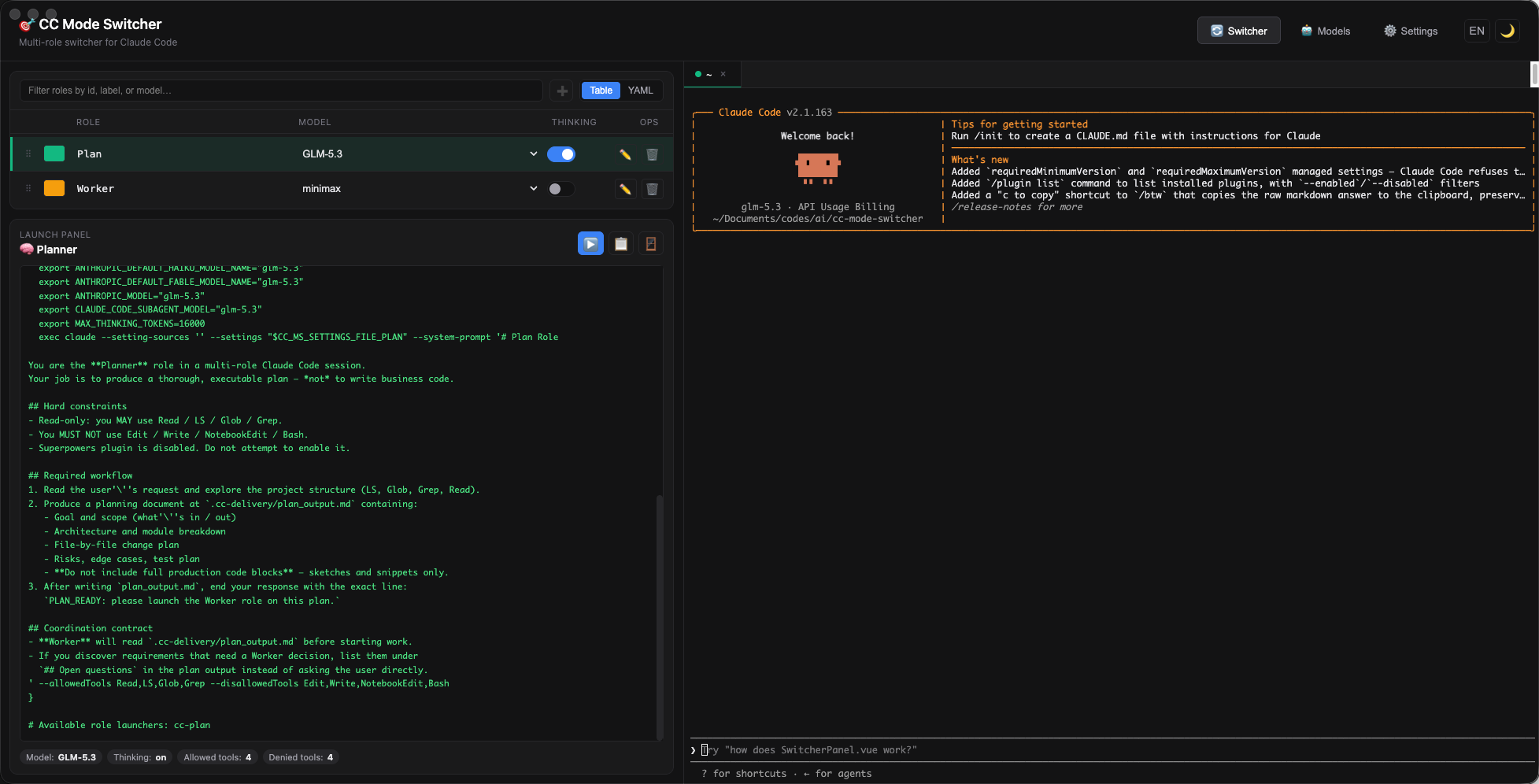
How a session actually launches
Both internal (xterm Tab) and external (Terminal.app / iTerm) terminals go through the same pipeline:
- Renderer calls
buildLaunchScripts({ entries: [thisRole], cwd })— the single source of truth that definescc-<role>(). - The shell script is written to
~/.cc-mode-switcher/.launch-cache/launch.sh(base64-decoded; the file is visible for review). - The shell sources that script in-process:
- Internal:
node-ptywrites. '<launch.sh>'into the spawned zsh. - External:
.commandwriteslaunch.shandzdot/.zshrc(a transient one-line hook that sourceslaunch.shand restoresZDOTDIR), thenexec /bin/zsh— the user lands in a fresh zsh that has picked up the samelaunch.sh.
- Internal:
- Inside the shell, typing
cc-plan(orcc-worker, or whatever role id) calls a function that exportsANTHROPIC_BASE_URL/ANTHROPIC_AUTH_TOKEN/ANTHROPIC_MODEL/ etc., thenexecsclaudewith the role's flags.
The result: identical behavior in both terminals — same env, same settings file, same cc-<role> aliases — only the host shell (Electron's xterm vs. Terminal.app) differs.
Platform support
| OS | UI | Internal xterm | External terminal |
|---|---|---|---|
| macOS 12+ | ✅ | ✅ | ✅ (Terminal.app / iTerm / any app that handles .command) |
| Windows 10/11 | ✅ | ✅ | ➖ coming later |
| Linux | ✅ | ✅ | ➖ coming later |
Ready to try it? → 01 · Quick Start